
0.1.0 - ci-build
0.1.0 - ci-build
SENAITEFHIRImplementationGuide - Local Development build (v0.1.0) built by the FHIR (HL7® FHIR® Standard) Build Tools. See the Directory of published versions
Actors:
This is what most people would consider the primary workflow in a LIMS integration: posting lab requests to SENAITE (the Provider) and making results available to an EHR (the External Consumer) either directly or via a middleware layer.
This workflow handles the following actions:
See:
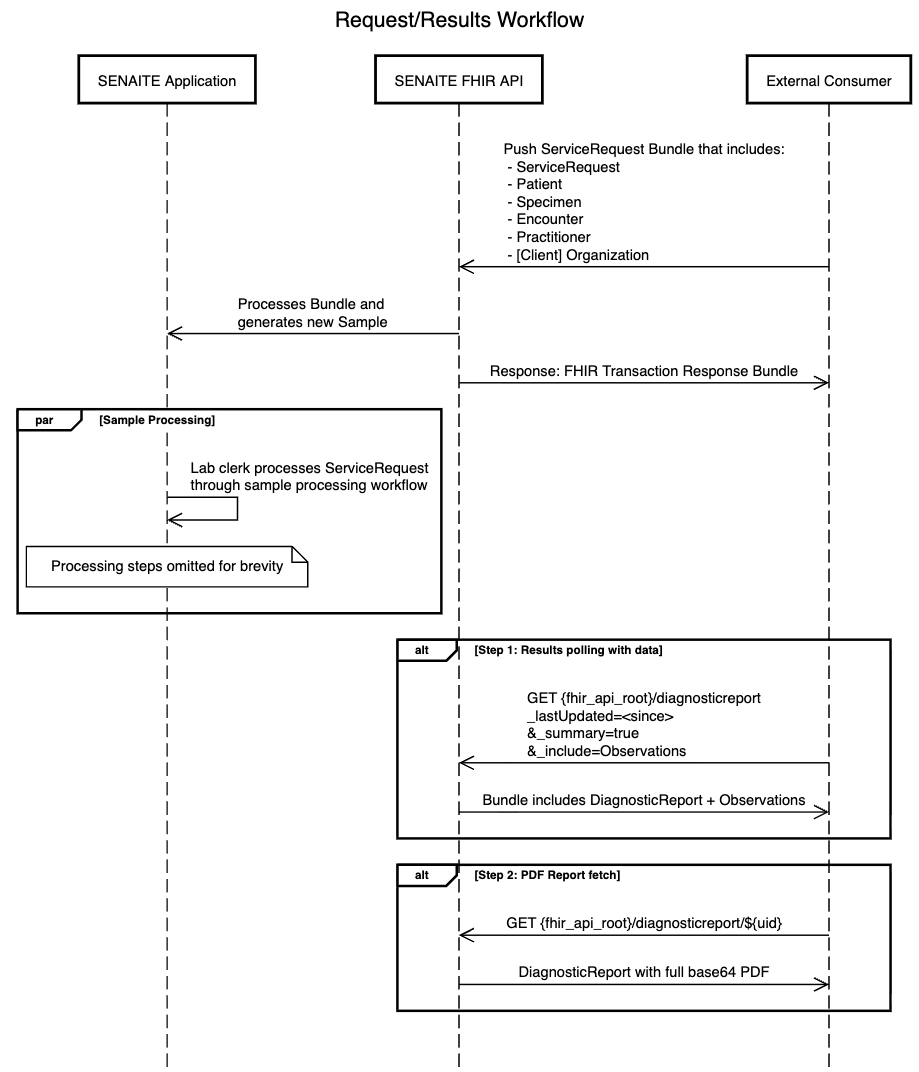
The diagram describes a request-in, poll-for-results integration pattern, where the consumer pushes a lab order, waits for the lab to process it, and then retrieves results either as structured FHIR data or as a PDF report.
Pushing the request: The workflow begins with the External Consumer (e.g. a hospital system or ordering application) POSTing a FHIR Transaction Bundle to the SENAITE FHIR API. This bundle contains all the resources needed to create a lab request, including the ServiceRequest, Patient, Specimen, Practitioner, and Organization (Client). The submitting Client Organisation is identified directly on the ServiceRequest via the SenaiteClient extension — unlike previous SENAITE IGs no Encounter is required. For an example Request Bundle see here. Please see Panel and orderDetail Behaviour in notes below on the relationship between panels and individual tests.
Internal processing: Once received, the FHIR API processes the Bundle and instructs the SENAITE Application to generate a new Sample — translating the FHIR resources into SENAITE's internal data model. SENAITE generates the Sample ID at this point; it is not present anywhere in the submitted Bundle and must not be supplied on POST. The optional Client Sample ID, if the consumer included one on the ServiceRequest and Specimen, is preserved as-is. Both identifiers appear on the DiagnosticReport retrieved in step 5. See Identifiers.
Acknowledgement: The FHIR API returns a FHIR Transaction Response Bundle back to the External Consumer, confirming that the request was received and processed successfully.
Sample processing (SENAITE internal): Shown as a parallel block, this step happens independently and asynchronously. A lab clerk works through the sample processing workflow in SENAITE — receiving, analysing, and resulting the sample.
Results polling: The Consumer regularly polls the FHIR API using a GET search of the following structure:
   GET {fhir_api_root}/DiagnosticReport
     ?_lastUpdated=gt<since>
     &_summary=true
     &_include=Observation:result
_lastUpdated=gt<since> — consumers should store the timestamp of the last successful fetch and pass it on each subsequent poll to retrieve only new or changed reports._summary=true — required on all search requests. For performance reasons the server will not return the full PDF payload during polling. Under _summary=true the presentedForm.data field (the base64-encoded PDF) is excluded; only metadata such as contentType and title is returned._include=Observation:result — instructs the server to return the associated Observation resources as sibling entries in the same Bundle, avoiding a second round-trip to retrieve discrete results.The response is a SenaiteResultsBundle containing the SenaiteDiagnosticReport and any associated SenaiteObservation entries.
PDF report fetch: After discovering a new report in the polling response, the Consumer retrieves the full PDF by performing a direct read of the DiagnosticReport by id — without _summary:
GET {fhir_api_root}/DiagnosticReport/{id}
The response is the complete DiagnosticReport resource with presentedForm.data populated as a base64-encoded PDF attachment.
orderDetail BehaviourThe ServiceRequest.code element identifies the ordered panel. The ServiceRequest.orderDetail element enumerates the individual tests to run and is governed by the following rules:
| Scenario | code |
orderDetail |
Server behaviour |
|---|---|---|---|
| Defer to panel | Panel code | Empty (omitted) | Sample is created for all tests defined in the panel |
| Full elaboration | Panel code | All tests in the panel enumerated | Sample is created for exactly the tests listed in orderDetail |
| Panel plus extras | Panel code | All panel tests enumerated, plus additional test codes | Sample is created for exactly the tests listed in orderDetail |
| Partial subset ❌ | Panel code | One or more panel tests are missing | Request is rejected — 400 Bad Request with an OperationOutcome |
| Defer to order detail | Default panel code (30954-2) |
One or more test codes | Sample is created for exactly the tests listed in orderDetail; no panel validation is performed |
| Default panel, no tests ❌ | Default panel code (30954-2) |
Empty (omitted) | Request is rejected — 400 Bad Request with an OperationOutcome |
When a named panel code is supplied, orderDetail is treated as a complete elaboration of the order: the server validates that all tests belonging to the panel are present, then creates the sample for exactly those tests — plus any additional tests listed beyond the panel's definition. Omitting orderDetail entirely defers to the panel's own definition. Supplying a partial subset is always rejected, as the server cannot infer which panel tests were intentionally excluded.
Note: This design intentionally diverges from the strict R5 multi-
ServiceRequestpattern for requesting multiple procedures. Rather than requiring oneServiceRequestper test, this server usesorderDetailas a structured elaboration of the order, keeping the request self-contained and aligned with SENAITE's internal model of a single Sample with a list of analyses. SeeorderDetailEncoding below for the R5-conformant structure used.
If the consumer supplies a named panel code with an orderDetail that omits tests from the panel, the request is rejected. The OperationOutcome will identify the missing codes, for example:
{
  "resourceType": "OperationOutcome",
  "issue": [{
    "severity": "error",
    "code": "business-rule",
    "details": {
      "text": "orderDetail is a partial subset of panel 57021-8 (CBC). Missing tests: [4544-3 Platelets [#/volume] in Blood]. Either omit orderDetail to use the full panel definition, or include all panel tests."
    }
  }]
}
To order the full panel without customisation, omit orderDetail entirely. To order a specific set of tests within or extending a panel, enumerate all intended tests in orderDetail. To order an arbitrary collection of individual tests without reference to any panel, use the default panel code (30954-2) and enumerate the desired tests in orderDetail. Ordering multiple named panels in a single ServiceRequest is not supported; consumers requiring tests from multiple panels should instead enumerate the individual tests using the default panel code.
orderDetail EncodingIn FHIR R5, orderDetail is a backbone element comprising an optional parameterFocus and one or more parameter entries, each with a typed code and a value[x]. This server uses one orderDetail entry per test, with a single parameter carrying the LOINC test code as a valueCodeableConcept. The parameter.code identifies the parameter type using the SenaiteOrderDetailParameterCS code system defined in this IG:
"orderDetail": [
  {
    "parameter": [{
      "code": {
        "coding": [{
          "system": "http://fhir.senaite.org/CodeSystem/senaite-order-detail-parameter-cs",
          "code": "test-code",
          "display": "Test Code"
        }]
      },
      "valueCodeableConcept": {
        "coding": [{
          "system": "http://loinc.org",
          "code": "718-7",
          "display": "Hemoglobin [Mass/volume] in Blood"
        }]
      }
    }]
  }
]
Because ServiceRequest.code is required when orderDetail is present in FHIR R5, consumers ordering a free-form selection of tests rather than a named panel must supply a sentinel value. The server recognises LOINC code 30954-2 (Relevant diagnostic tests/laboratory data note) as this sentinel:
"code": {
  "concept": {
    "coding": [{
      "system": "http://loinc.org",
      "code": "30954-2",
      "display": "Relevant diagnostic tests/laboratory data note"
    }],
    "text": "Relevant diagnostic tests/laboratory data note"
  }
}
When this code is present, the server bypasses panel validation entirely and creates the Sample for exactly the tests listed in orderDetail. Individual test codes should be LOINC-coded where available. Omitting or leaving orderDetail empty when using the default panel code is an error, as there is no panel definition to fall back on.
The same default panel code appears on outbound DiagnosticReport resources when the underlying SENAITE Sample does not correspond to exactly one named panel. This covers two cases:
ServiceRequest using the default panel code.ServiceRequest.In both cases, DiagnosticReport.code is set to 30954-2 and the individual test results carried as Observation resources (referenced via DiagnosticReport.result) are the authoritative record of what was ordered and resulted. Consumers should treat the Observation entries as the primary source of test identity in these reports, using DiagnosticReport.code only to recognise that a single named panel does not apply.
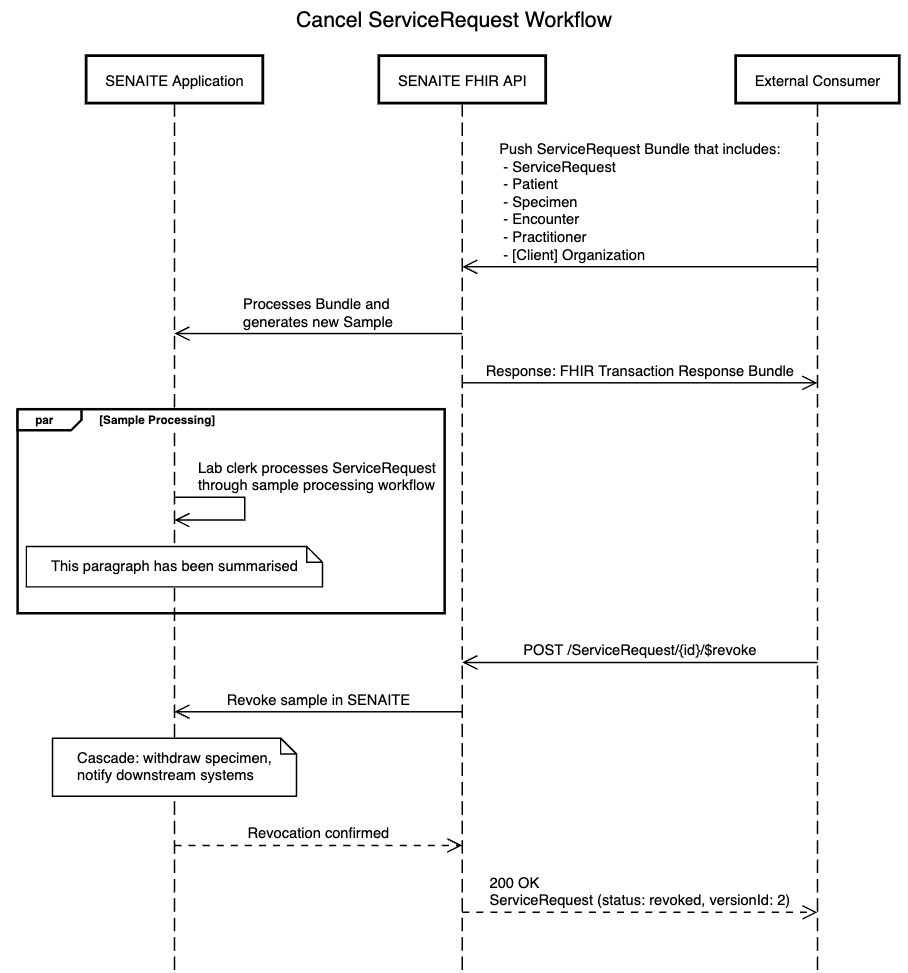
ServiceRequest/{id}/$revoke with optional reason(s) as to why this is being revoked as the body, for example:
{
  "resourceType": "Parameters",
  "parameter": [
 {
   "name": "reason",
   "valueString": "Sample lost in transit"
 },
 {
   "name": "reason",
   "valueString": "Patient requested revocation of processing"
 }
  ]
}
Cancelled, and notifies downstream systems as needed.200 OK with the updated ServiceRequest resource set to status: revoked and an incremented versionId.In the diagram, this revoke workflow is effectively a conditional branch from the sample processing stage: the main workflow continues toward result publication, while the revoke workflow terminates the request cleanly and signals the external consumer that the ServiceRequest has been revoked.
A posted ServiceRequest can only ever create a Sample in the sample_received (Received) state. The registered and sample_due states are therefore unreachable via this workflow.
| FHIR ServiceRequest Status | SENAITE Transition | Side Effects | Condition | Notes |
|---|---|---|---|---|
active |
(none) → sample_received |
New Sample created | ||
$revoke |
sample_received → cancelled |
Sample cancelled | No reason included | This transition is configurable per deployment |
$revoke |
sample_received → rejected |
Sample rejected | Reason included | This transition is configurable per deployment |
$revoke |
to_be_verified | verified → rejected |
Sample rejected |
When a consumer fetches a DiagnosticReport, its status is derived from the current SENAITE Sample state. Because Samples in this workflow are always created via an inbound ServiceRequest, the registered and sample_due states are not reachable and have no mapping.
| SENAITE Sample State | Label | FHIR DiagnosticReport Status |
|---|---|---|
sample_received |
Received | preliminary |
to_be_verified |
To be Verified | preliminary |
verified |
Verified | preliminary |
published |
Published | final |
invalid |
Invalid | entered-in-error |
rejected |
Rejected | cancelled |
cancelled |
Cancelled | cancelled |
retracted |
Retracted | entered-in-error |
dispatched |
Dispatched | (previous valid state) |
Note on
dispatched: Dispatched is a configurable state indicating that the sample has been sent from the lab. Because a sample can be dispatched from multiple upstream states, theDiagnosticReport.statusis derived from the sample's last valid state prior to dispatch rather than being fixed. For example, a sample dispatched afterpublishedwill yield afinalreport.