
0.1.0 - ci-build
0.1.0 - ci-build
SENAITEFHIRImplementationGuide - Local Development build (v0.1.0) built by the FHIR (HL7® FHIR® Standard) Build Tools. See the Directory of published versions
This workflow describes a FHIR R5 native instrument integration pattern where the
Instrument Middleware acts as the translation layer between the instrument's proprietary
protocol and FHIR. The middleware polls for instrument work units via SenaiteInstrumentServiceRequest resources and pushes
results back as individual FHIR Observations — one POST per result. This workflow feeds
directly into the Request/Results Workflow once results are published.
See:
This includes the SenaiteWorksheetTask profile described below.
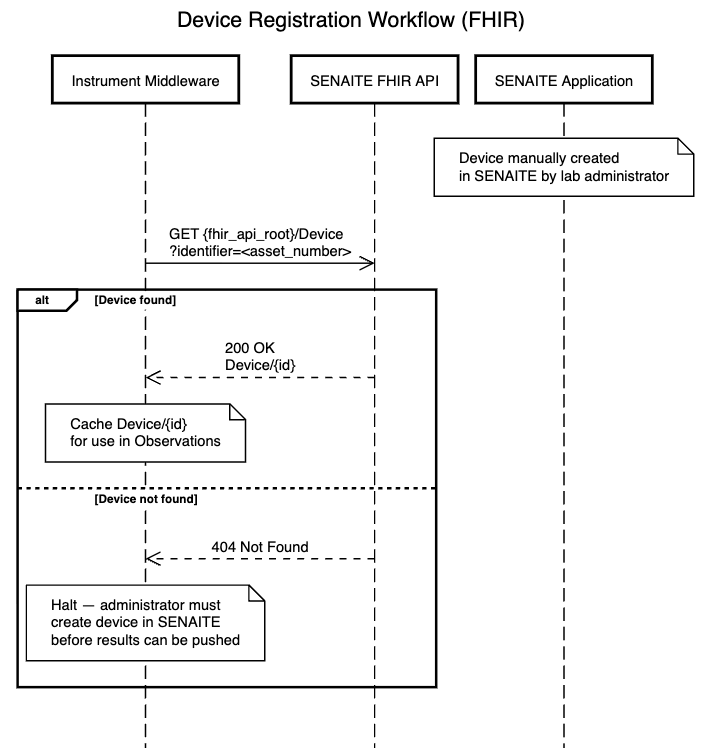
Before the instrument workflow can begin, each laboratory instrument must be manually registered in SENAITE by a lab administrator via the instrument management interface. This is the source of truth for device records — SENAITE owns the instrument registry, not the middleware.
Once registered, the middleware performs a one-time GET at startup to confirm the device exists and retrieve its logical ID:
GET {fhir_api_root}/Device?identifier=<asset_number>
If the device is found, the middleware caches the returned Device/{id} and includes it
in the Observation.device reference on every subsequent result POST. If the device is
not found, the middleware should halt and alert the administrator — results must not be
pushed without a valid device reference, as SENAITE will be unable to attribute results
to the correct instrument for QC and audit purposes.
Note:
Observation.deviceis optional at the profile level to allow the profile to serve both the request/results and instrument workflows. For the instrument workflow, populatingdeviceis expected on every Observation.
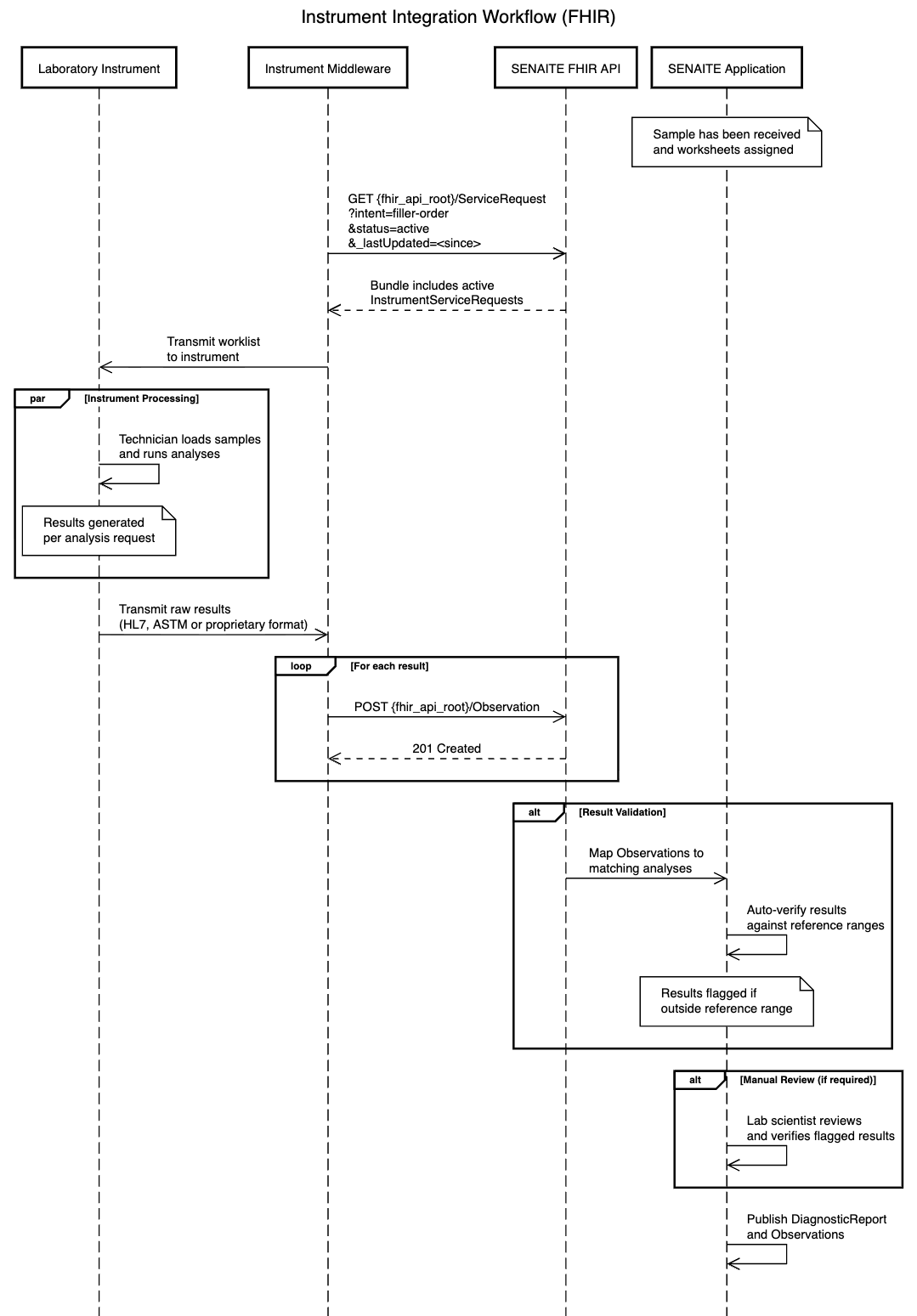
Pre-condition — sample reception (SENAITE internal): Before the instrument integration workflow begins, the sample has already been received by the lab and worksheets have been assigned internally within SENAITE. This is the trigger point for the instrument integration to commence.
Worklist fetch (Instrument Middleware → SENAITE FHIR API): The Instrument Middleware polls the SENAITE FHIR API for active instrument work units using a FHIR R5 GET against the ServiceRequest endpoint, filtered by intent=filler-order, status=active, and _lastUpdated=<since>. The intent=filler-order parameter is mandatory — it restricts results to SenaiteInstrumentServiceRequest resources (the device-scoped work units generated by SENAITE) and excludes the panel-level SenaiteServiceRequest resources (intent=order) placed by external consumers. The FHIR API responds with a Bundle containing the matching instrument ServiceRequests.
Worklist transmission (Instrument Middleware → Laboratory Instrument): The Instrument Middleware translates the FHIR ServiceRequests into the instrument's native format (e.g. HL7, ASTM or proprietary) and transmits the worklist to the Laboratory Instrument. This translation layer is a key responsibility of the middleware but its details are out of scope for this IG.
Instrument processing (Laboratory Instrument — internal): Shown as a parallel block, this step happens independently and asynchronously. The technician loads the samples onto the instrument and runs the analyses. Multiple results are generated per ServiceRequest as the instrument completes its processing — for example a full blood count ServiceRequest would generate individual results for haemoglobin, white cell count, platelets and so on.
Results transmission (Laboratory Instrument → Instrument Middleware): Once analyses are complete, the Laboratory Instrument transmits the raw results back to the Instrument Middleware in its native format (HL7, ASTM or proprietary). The middleware is responsible for receiving and interpreting these results.
Results push (Instrument Middleware → SENAITE FHIR API): The middleware translates each raw instrument result into a FHIR Observation and POSTs it individually to {fhir_api_root}/Observation. Each Observation references the originating ServiceRequest via Observation.basedOn — allowing SENAITE to match the result to the correct lab request — and references the instrument via Observation.device. Results are posted as they arrive from the instrument rather than buffered until all analyses are complete.
Result validation (SENAITE FHIR API → SENAITE Application — internal): The FHIR API maps each incoming Observation to its matching analysis within SENAITE. The application then auto-verifies results against configured reference ranges, flagging any that fall outside acceptable limits for further review.
Note: The instrument or middleware never populates
Observation.referenceRangeon the POST — SENAITE looks up the configured range for the analyte itself at this step. The range only appears later, in theObservationthe consumer retrieves via the Request/Results Workflow — see Reference Ranges.
Manual review — if required (SENAITE Application — internal): Where results have been flagged outside reference ranges, a lab scientist reviews and manually verifies them before they are accepted. This step is conditional and only occurs when auto-verification has not passed.
Publication (SENAITE Application — internal): Once all results have been verified — either automatically or manually — SENAITE publishes the DiagnosticReport, grouping all associated Observations via DiagnosticReport.result. This makes the results available for retrieval via the FHIR API by the External Consumer as described in the Request/Results Workflow.
When the Instrument Middleware polls for active work (step 2 above), it filters by status=active. The following table defines how each SENAITE Sample state maps to a FHIR ServiceRequest status, determining whether a given Sample appears in the middleware's worklist.
| SENAITE Sample State | Label | FHIR ServiceRequest Status |
|---|---|---|
sample_received |
Received | active |
to_be_verified |
To be Verified | active |
verified |
Verified | completed |
published |
Published | completed |
retracted |
Retracted | entered-in-error |
rejected |
Rejected | revoked |
cancelled |
Cancelled | revoked |
Not all instrument work arrives as loose SenaiteInstrumentServiceRequest resources polled directly off the
ServiceRequest endpoint. SENAITE also supports worksheets — which according to the documentation:
Group analyses across samples and clients into a single working batch. Blanks, controls and duplicates sit alongside real analyses and are evaluated automatically during verification.
This implementation refers to a specific type of worksheet that represent a single run on a single instrument. These use a worksheet template that defines the batch's capacity (number of slots), an instrument and any internal QC checks (e.g. blanks to verify calibration, duplicates to compare repeat results).
This IG represents only that type of worksheet as a SenaiteWorksheetTask
(a profiled FHIR Task). This is optional and complementary: instrument work may never be assigned to a worksheet and will
continue to flow exactly as described above, unaffected. For example, there could always be an analysis that is either more urgent and so cannot wait to be placed into a instrument worksheet.
When present though, a worksheet is simply an additional entry point for the Instrument Middleware to discover a batch of work in one request rather than polling
ServiceRequest directly.
A worksheet is "a single run of an instrument, that tracks a list of analyses" —
which maps directly onto FHIR's Task resource:
Task.requestedPerformer references the SenaiteDevice the worksheet is scoped to. owner's target
types in FHIR R5 don't include Device (only Practitioner/PractitionerRole/Organization/CareTeam/Patient/RelatedPerson),
so requestedPerformer is used instead — the only Task element in R5 that can hold a Device reference. Despite
the "requested" naming, there is no separate negotiation step here: worksheets profiled by this IG are always
single-instrument and scoped to that instrument from creation, so the value is pinned rather than a true
candidate list.Task.input carries a direct, forward reference to each SenaiteInstrumentServiceRequest on the
worksheet. The middleware resolves each with a direct GET — there is no reverse search and no back-reference
from the SR to its worksheet. This keeps the existing worklist-polling pattern (ServiceRequest?intent=filler-order&status=active)
completely unaffected by whether a given SR happens to sit on a worksheet. Consumer-side checks can be made to determine whether a given SR is being referenced by a Task.WorksheetCapacity extension carries the template's slot count, so consumers can gauge how full a
worksheet is. Once a worksheet is locked (see below), this becomes a hard ceiling rather than a snapshot.Task.priority is deliberately absent. Priority is a property of the individual samples/analyses on a
worksheet, not of the worksheet itself.From the moment it is created, a worksheet is in open mode, but it only has a related FHIR Task once at least
one analysis is attached. Further analyses can still be added or removed while the worksheet is in open mode
(and the Task is in draft). Once work is ready to begin, the worksheet is set to ready to indicate all
analyses have been added — this locks the worksheet and sets the corresponding Task to ready.
Once it has been received by an instrument the middleware will PATCH an update to the Task setting the status to in-progress and the underlying worksheet will transition to in progress state. It will remain locked.
A worksheet can also be acted on while it is still open (Task draft) and samples are attached: in that
case the in-progress PATCH is sent directly, skipping ready, and locks the worksheet as an immediate side
effect of SENAITE accepting that write.
A worksheet in SENAITE now has five states relevant to a FHIR consumer. Only the first four ever produce a
SenaiteWorksheetTask; SENAITE's closed state (no analyses attached) never does, so there is nothing for a
Task to represent:
| SENAITE Worksheet State | Meaning | FHIR Task Status | Who sets it |
|---|---|---|---|
open |
Not yet locked; still being assembled | draft |
SENAITE (internal) |
ready |
Locked; composition frozen; safe to claim and act on | ready |
SENAITE (internal) |
| (in progress) | The owning instrument/middleware has begun acting on it | in-progress |
The consumer — see below |
to_be_verified |
All analyses have results; paused, awaiting a verifier | on-hold |
SENAITE (internal) |
verified |
Verification complete — the work is done | completed |
SENAITE (internal) |
closed |
No analyses attached | (no Task at all) | — |
Every transition above is observed passively by the consumer on read — except the transition to
in-progress, which is written by the consumer itself: the owning instrument/middleware sets it directly via
a conditional PATCH, from either ready or draft, the moment it's actually handing the worklist to the
instrument. This follows the standard HL7 workflow pattern for a Task's owner ("Fulfiller") reflecting its own
progress by writing directly to the Task, rather than through a bespoke operation — a plain status update
carries no extra business logic here, unlike (for example) the $revoke operation on
SenaiteInstrumentServiceRequest, which exists specifically because revocation has guard conditions and side
effects a simple field change doesn't.
Because this is the only client-writable transition on this profile, and because two middleware instances could
in principle race to claim the same worksheet, this write must be conditional: clients supply If-Match
with the ETag/versionId from their last read, and the server rejects with 412 Precondition Failed if the
Task has changed since (i.e. someone else already claimed it) and with 409 Conflict for any attempted
transition other than ready -> in-progress or draft -> in-progress. No other write is supported against
this profile — every other transition remains entirely SENAITE-internal.
This mirrors the Sample State → ServiceRequest Status table above: both are internal SENAITE lifecycles
distilled down to the handful of FHIR-meaningful states a consumer actually needs to act on.
Where the Instrument Middleware sits between this API and an analyser speaking ASTM or HL7v2 (OML/ORU), it's worth being explicit that the worksheet's lifecycle is entirely a host-side (FHIR/SENAITE) construct: neither protocol has any concept of a worksheet or a batch-level status. Both operate per specimen/order — an ASTM session streams Header/Patient/Order/Result records for one specimen at a time, and HL7v2 carries per-test result status on the OBX segment, not on the batch as a whole. Practically, this means:
Task.input entries and whatever specimen/order identifiers it sends downstream — there is no field in
either protocol to carry a worksheet identifier.in-progress PATCH described above corresponds to the point the middleware actually hands the
worklist to the instrument on the wire (whether that's answering an ASTM Query record with Order records, or
transmitting an unsolicited HL7v2 OML message) — a concrete, protocol-level event to anchor the write to,
regardless of which instrument driver is in use.to_be_verified/verified were never expected to have a wire-protocol counterpart: verification is a
host-side judgement made after all individual results have already arrived, and neither protocol has a
message for "the batch is signed off."This variant replaces step 2 of the main sequence above (the direct ServiceRequest poll) with a Task fetch,
resolving each entry in Task.input, and an explicit claim step before transmission. Everything from worklist
transmission onward is identical to the standard workflow.
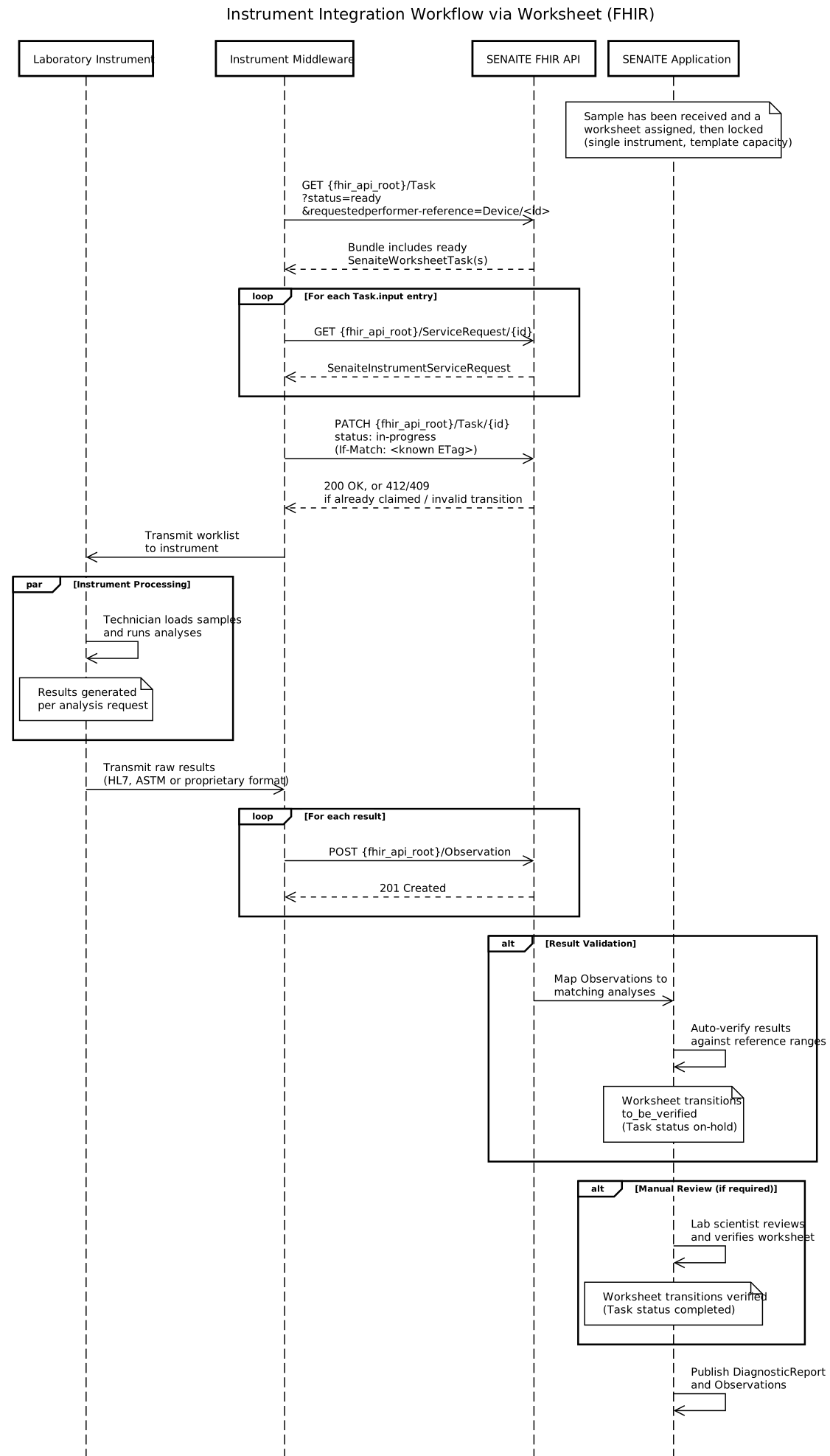
GET {fhir_api_root}/Task?status=ready,draft&requestedperformer-reference=Device/<instrument-id>
— including draft alongside ready since, as above, a worksheet can be acted on before it's been explicitly
locked.Task.input, the
middleware performs a direct GET {fhir_api_root}/ServiceRequest/{id} to retrieve the referenced
SenaiteInstrumentServiceRequest.in-progress
via a conditional PATCH (If-Match: <ETag>), immediately before handing the worklist to the
instrument. A 412/409 response here means another consumer already claimed it, or the worksheet is no
longer in a state where this transition is valid.to_be_verified (Task on-hold). Once a lab scientist verifies the batch, it transitions to verified
(Task completed) — independent of the individual status of each analysis SR, which continues to follow the
status mapping table above.